|
Choose your Email Client:
Open Outlook Express:
Click on File -> Export -> Address book.
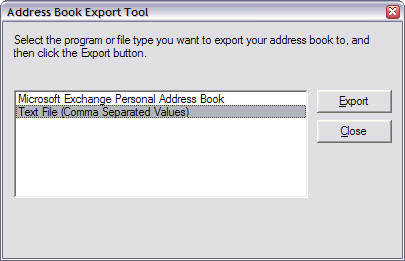
Select 'Text File (Comma Separated Values), then Click on Export
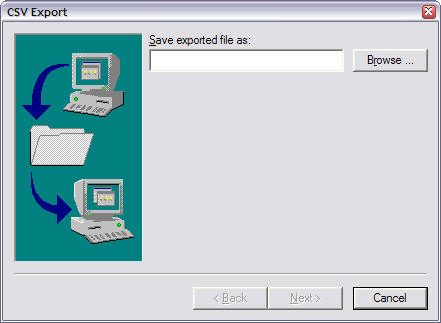
Click on Browse and located your desktop. Enter a Name for the file and Click on Save. Then click on Next
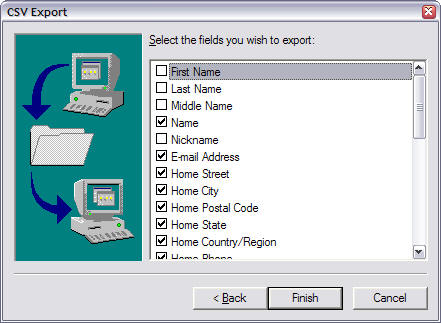
Select the fields that you wish to export and then click Finish.
Log into your 550access webmail -> click on address book -> click on Import/Export.
Verify the format and the destination, then click on Browse. Locate the saved file on your desktop and click on Open. Then click on Import.

Open Microsoft Outlook:
Click on File -> Import and Export.
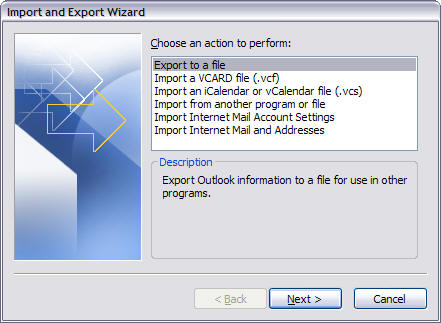
Select Export to a file, then click Next.
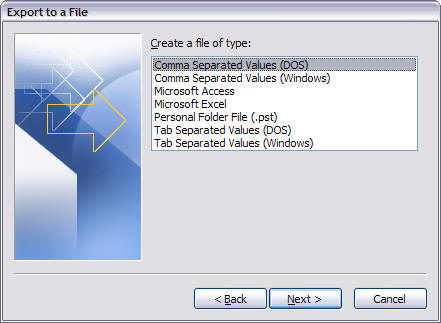
Select "Comma separated Values (DOS)" then click Next.
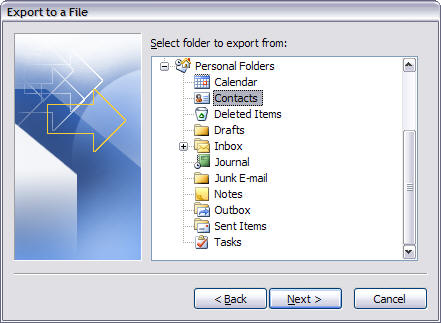
Select "Contacts" and then click Next.
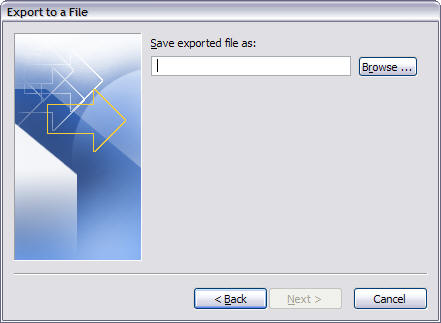
Click on Browse, located your desktop and name your file, click Save, then click Next.
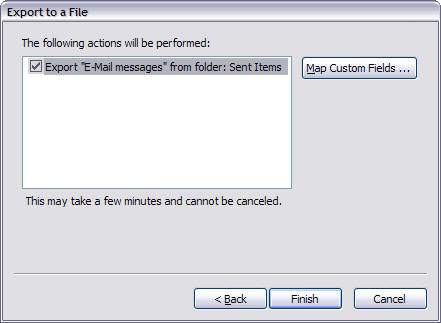
Click Finish.
Log into your 550access webmail -> click on address book -> click on Import/Export.
Verify the format and the destination, then click on Browse. Locate the saved file on your desktop and click on Open. Then click on Import. |